Volvo Car Show mode
Troubleshooting
The Volvo Car Show mode product is distributed and supported by Brigo AB on behalf of Volvo Car. For support or ordering questions please send an email to .

Volvo Car Show mode: Known Issues & Limitations
Follow the checklist below if Show mode fails to start;
Show mode LED states, troubleshooting startup issues
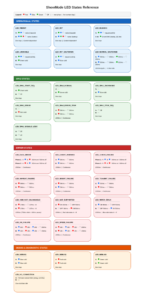
Low voltage, 12V battery (LED_12VBAT_FAILURE and LED_12VBAT_WARNING)
The controller will continue to check the battery voltage every 30 minutes and will start Show mode as soon as the voltage is ok (above 12.5V).
Low voltage, High voltage battery (LED_400VBAT_FAILURE)
If the high voltage battery SOC drops to low (approximately 15%, depending on battery model and make) the controller will shut down. Show mode and will not try to restart automatically.
48V battery (LED_48VBAT_FAILURE)
If the SOC on the 48V battery on mild hybrids drops to low, Show mode will initiate a charging process where the 48V battery is charged from the 12V side. If this charging process fails or of the 48V battery stops responding to communication Show mode will shut down and will not restart automatically. To resolve this, unplug Show mode, drive the car to charge the 48V battery and then reinstall Show mode.
Wiper stalk (LED_WIPER_STALK)
Wiper stalk must be in off position when starting Show mode. Unplug Show mode, set wiper to off position and reinsert Show mode.
Wrong mode
If the car is already in Active or Driving mode (by using the car key) when the controller is installed the controller will enter a waiting mode. The LED A or B will flash with green to indicate power is ok but will not enter the initialization phase (with blue flashing).
There are several reasons why this can happen, to start the system again just unplug and reconnect the Show mode controller in the OBD port then check for possible reasons from the list below;
No the engine start is blocked and the parking brake is always engaged.
Check the following things first;
Note! EUCD cars as well as V40, V40CC are no longer supported from version 6.0 and onwards.
We are happy to help, please send an e-mail to , state Support Show mode in the title and provide us with the following information;